Build the Manicure from the Base Up
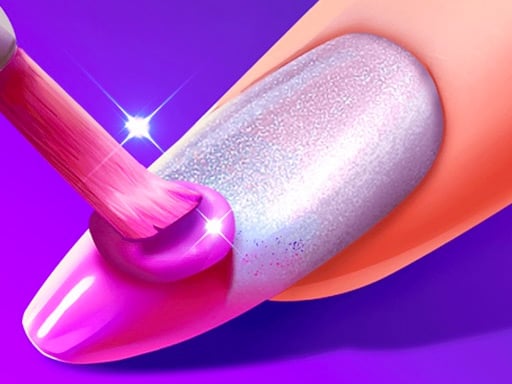
Girls Nail Salon is a focused nail-art simulator. Its central loop is simple but layered: clean the nails, choose a base colour or finish, then add patterns and decorations. The design is judged visually rather than by a confirmed story or score, so the useful question is which layers belong together.
Public descriptions identify colourful polish, gradients, glitter, textures, patterns, shapes, stickers and gems. The current browser build is the authority for which of those controls are visible.
A Reliable Salon Order
- Start the nail or hand preparation step shown by the game.
- Choose the nail shape or base option when available.
- Apply one polish colour or gradient.
- Add glitter or a texture only if it supports the base.
- Use one repeated pattern, sticker or gem as the main decoration.
- Review the complete hand before adding another accent.
The base colour should come before decoration because it determines contrast. A glitter finish can make a small sticker disappear, while a plain base gives a pattern more space.
Colour, Finish and Pattern
Use two related colours when you want a coordinated manicure, or reserve contrast for an accent nail if the interface allows individual selection. Gradients and glitter already create visual movement, so they usually need fewer additional decorations.
Patterns and textures are strongest when they repeat a small idea across the set. A different large image on every nail can make the manicure look disconnected. One motif, repeated with small changes, gives the hand a clearer identity.
Stickers and Gems as Finishing Layers
Stickers and gems are not the foundation. Add them after the polish has been chosen and compare the hand at normal size. If a gem hides the pattern or makes the nail too busy, remove the newest item before changing the whole colour palette.
This is editorial styling advice, not a game requirement. The browser game is designed for free visual combinations rather than one correct result.
Common Mistakes
Decorating before choosing the base
Without a base colour, it is difficult to judge whether the pattern belongs. Select the polish first.
Using every finish at once
Gradient, glitter, texture, pattern and gems can each attract attention. Let one or two lead and keep the rest quieter.
Clicking beside the nail target
Select the product, then apply it to the visible nail area. If nothing changes, retarget the nail rather than repeatedly clicking empty space.
Assuming the app and browser have the same options
Several mobile products share the title but can expose different controls. Follow the current GameMonetize browser build.
If the Design Does Not Change
Check that the product is selected, the nail is visible, and the current action has finished. If the interface uses a separate hand or nail view, complete the visible nails before looking for a next control. Progress saving has not been confirmed for this embed, so do not rely on a refresh to preserve the manicure.
Replay Ideas
Try a single-colour salon set, a glitter-led design and a pattern-led design with restrained gems. Keep the shape fixed while changing the finish, then keep the finish fixed while changing the decoration. This makes the differences between the layers easy to see.
Compare It with Similar Nail Games
Nail Salon - Marie's Girl Games spends more time on cleaning, trimming, filing, rinsing and moisturizing before decoration. Princess Nail Makeup frames the manicure around a princess model and royal-style accessories. Girls Nail Salon is the better choice when the main appeal is experimenting with polish finishes, patterns and decorative combinations.
Use the mouse to select tools, colours and decorations. For more beauty games, browse Makeup Games or Princess Games.
What Players Usually Want to Know
Searchers arriving at a nail salon game usually want practical answers, not a generic promise that the game is creative. They want to know what to click first, whether the nails need to be cut or shaped, how to apply polish without missing the target, and how to build a design that does not become crowded.
For this browser version, the useful answer is to treat the manicure as a sequence of layers. Start with the nail surface. Choose the colour or finish. Add the main pattern. Then decide whether a sticker or gem improves the result. If you reverse that order, you may spend time decorating a surface that later changes.
The Preparation Stage
Public browser descriptions identify nail cleaning and preparation as part of the experience. Begin with the visible task presented by the current screen. If the tool is a clipper, use it on the broken or overlong nail area indicated by the game. If the interface presents a shape choice, make that decision before applying colour.
Preparation has two jobs. It gives the nail a cleaner outline, and it gives the later decoration a stable surface. A sticker placed before the base is complete is harder to judge because its contrast may change when the polish is applied.
Do not move on just because the tool has been selected. Look for the visual response that tells you the action registered. If the nail has not changed, repeat the gesture over the target rather than clicking the tool icon again and again.
Nail Shape and Design Space
Shape controls how much visual space the design has. A shorter nail can suit a simple colour and one small decoration. A longer shape can make a gradient, pattern or gem easier to see, but it can also expose empty areas that need a more deliberate composition.
There is no confirmed “best” nail shape in the current browser build. Choose the shape that supports the look you are trying to create. For a quiet manicure, use the shape as a clean foundation. For a bolder nail-art set, let the shape give the pattern enough room without adding too many unrelated elements.
Applying Polish Without Losing the Base
The polish step establishes the largest colour area. Use one dominant colour first, then check the complete hand before adding a second shade.
If the game presents a gradient, compare it with a flat colour before choosing. A gradient already contains movement, so it may not need a large sticker on every nail. Glitter also changes the visual weight of a colour: a quiet pink with glitter can become the main feature, while a bright colour with glitter may be too strong beside a large pattern.
When a polish does not apply, check three things:
- The polish tool is active.
- The pointer or touch point is over the visible nail.
- The previous preparation action has finished.
The browser may ignore a click outside the nail. That is a targeting issue, not necessarily a problem with the colour choice.
Gradients, Glitter and Texture
These finishes answer different design questions. A gradient creates a transition between colours. Glitter adds sparkle and small highlights. A texture changes the surface character of the polish.
Choose one of them as the lead finish. If the gradient is the main idea, use decoration to support its direction. If glitter is the lead, a quieter pattern can stop the hand from becoming visually noisy. If the base texture is subtle, a repeated sticker can make the set feel more intentional.
Do not use every finish simply because it is available. The game is about constructing a readable manicure, not proving that every tool was opened.
Patterns and Shapes
Patterns give the hand a repeated visual rhythm. Use the same motif across several nails when you want a coordinated set, or reserve a different pattern for one accent nail when the interface allows it.
A pattern should have enough contrast to be visible but not so much that it erases the base colour. If the pattern disappears, adjust the base or choose a simpler finish before adding more decoration. If it dominates, reduce the number of patterned nails or keep the gems away from the busiest area.
This is also where seasonal or themed designs can be built, but the current sources do not confirm fixed seasonal levels for this specific browser version. Treat any theme as a player-created style unless the interface explicitly labels it.
Stickers and Gems
Stickers and gems work best as finishing layers. A sticker can provide the recognisable motif, while a gem can act as a small highlight. They do not need to appear on every nail.
Try a three-part composition:
- most nails carry the base colour;
- one or two nails carry the main sticker or pattern;
- a gem repeats a colour or marks the accent area.
This structure leaves enough empty space for the hand to remain readable. If every nail has a large sticker, multiple colours and several gems, the eye has nowhere to rest.
A Client Request, If the Game Shows One
Some public listings describe a client-facing version of Girls Nail Salon in which the player fulfils nail-art requests. The current GameMonetize browser build remains the source of truth for whether a request, target or level is visible during your session.
If the game displays a requested design, follow that visible instruction before adding free decorations. If it does not show a request, do not invent one. Build the manicure around the tools actually presented by the current screen.
This distinction matters because similarly named mobile and browser games can expose different structures. App descriptions mention features that are not automatically confirmed in this embed.
How to Create Three Different Manicures
Polish-Led
Choose one strong colour and keep patterns small. Use a gem only when the base needs a highlight.
Pattern-Led
Use a calmer base, repeat one motif and reserve the most detailed pattern for an accent nail.
Glitter-Led
Let the finish provide the sparkle, then use stickers and accessories sparingly so the hand does not become overloaded.
Keep the nail shape constant when comparing these looks. That way you are testing the finish and decoration rather than changing every variable at once.
When the Manicure Looks Unbalanced
If the final hand feels too bright, change the finish before changing the entire colour palette. If it feels too plain, add one pattern or sticker rather than five new elements. If the hand feels disconnected, repeat one existing colour in the gem or accessory.
Look at the hand from a normal viewing distance. A detail that looks impressive when enlarged may be too strong when the whole manicure is visible. The best adjustment is often removing the newest item.
Browser Controls and Mobile Caution
The game data records mouse controls. Public descriptions of similarly named browser versions describe clicking the tool buttons and sliding the active tool over the nail. Use that as a practical interaction guide, but follow the current embed if its prompt differs.
Mobile and app listings are not interchangeable with this GameMonetize build. The current page should be tested on the device you care about before promising a specific mobile experience. Progress saving is not confirmed for the embedded version.
Frequently Asked Questions
What should I do first?
Follow the visible preparation step, then choose the base polish before adding decorations.
What kinds of nail art are available?
Public browser descriptions identify colours, gradients, glitter, textures, patterns, stickers and gems. The exact set depends on the current build.
Can I make a different design each time?
Yes. Change one layer at a time to compare a colour-led, glitter-led or pattern-led manicure.
Does progress save?
Progress saving has not been confirmed for the current Girl-Games.io embedded build.
Sources and Version Notes
- Y8 listing — browser identity, cleaning, polish and nail-art description.
- Zarium listing — HTML5 simulator identity and manicure focus.
- Google Play listing — nail polish, gradients, glitter, textures, patterns, stickers and gems; app-only claims were not imported as browser facts.