Create an Anime Doll Your Way
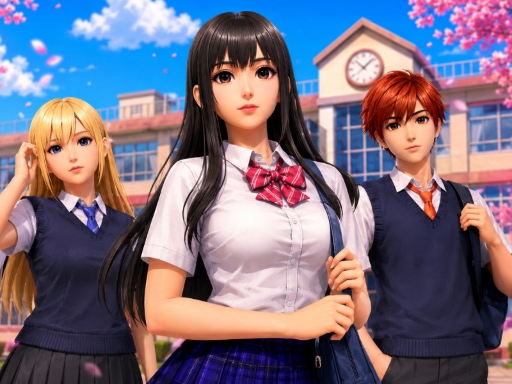
Anime Dress Up: Doll Dress Up is a browser character creator built around a customizable anime doll. Instead of starting with a fixed outfit, you begin with the avatar itself and decide how the character should look. Facial features, hair, clothing and accessories can all change the impression of the finished doll.
The game is useful when you want to compare visual choices without learning complicated controls. A new hairstyle changes the silhouette, while eyes, eyebrows and mouth give the character a different expression. Clothes establish the theme, and smaller items such as glasses, bags, socks, jewellery or wings provide the final detail.
How to Play
Open the Avatar or character-creation area and work from the largest choices to the smallest. Select a skin tone and face details, choose a hairstyle and hair colour, then build an outfit from dresses or separate tops, bottoms and jackets. Finish with shoes and accessories.
On desktop, use the mouse to select the visible options. On a supported touch device, tap the same controls. The game is designed so that each choice can be seen immediately, making it easy to replace one item without restarting the whole character.
Main Features
The wardrobe is only one part of the game. Created looks can be revisited through the archive, and poses make the finished doll feel more expressive. The game also includes themed fashion activities where the outfit is judged against a requested setting. A look for school, a fantasy scene, a café or a stage needs a different balance of colours and accessories.
Some play is also connected to a dollhouse. As you progress through fashion activities, the available rooms and furniture give the character a place beyond the wardrobe screen. These features make the game closer to an avatar creator than a single static dress-up picture.
Styling Tips
Choose one strong idea before filling every slot. A dramatic hairstyle can guide the clothing, while a simple hairstyle leaves room for a detailed outfit. When a look feels crowded, remove one accessory rather than changing everything. For a themed scene, start with the setting and select clothes that explain why the doll belongs there.
Try making two versions of the same character: one casual and one formal. Keeping the face the same makes it easier to see how much the hair, clothing and accessories change the character’s role.
Build the Character in Layers
Establish identity before decoration: choose the base and face, set the hairstyle and colour, build the clothing silhouette, then add shoes and accessories. The face and hair frame the character, while the outfit explains the setting. You can change the order, but this sequence makes comparisons easier.
Match the Outfit to the Scene
Public listings describe anime-inspired fashion choices and themed settings. Use a school, café, fantasy or stage setting as a design prompt rather than assuming it is a score target. Start with one visual signal, such as a jacket, dramatic hair colour or large accessory, then let quieter pieces support it.
Face, Hair and Clothing Relationship
Changing the expression can change the meaning of the same outfit. Hair changes the outline around the face and the amount of attention above the clothing. When two choices compete, remove the newest one and compare the avatar again instead of resetting the whole doll.
Poses, Archive and Dollhouse Elements
Third-party descriptions for this title mention revisiting created looks, poses and dollhouse-style settings. These elements extend the creator beyond a single portrait. Use a pose or room to support the character concept. Save and export behaviour can vary by build, and persistent progress has not been confirmed for Girl-Games.io.
Common Mistakes
Adding accessories before the face is readable
Glasses, hats, wings or large decorations can cover the features that establish the character. Finish the face and hair first, then add the accessory back if it supports the idea.
Choosing a theme after every item is fixed
A scene works better as an early direction. If the outfit cannot explain the setting, change the main clothing shape before changing small details.
Treating every colour as a focal point
Keep one main colour and one accent when the outfit is busy. Use stronger contrast only where you want the eye to land.
Assuming an app feature is in the iframe
The browser build may not expose every save, share or archive feature described for other versions. Follow the controls visible in the current player.
If a Choice Does Not Apply
Check that the category is active and that the selected item is not hidden behind another layer. Remove the newest accessory and try the underlying clothing or hair again. If the provider is still loading, wait until the avatar responds before diagnosing a missing option.
Compare It with Similar Games
Kawaii Chibi Creator is more focused on a compact avatar-maker workflow, while Anime Dress Up: Doll Dress Up places more emphasis on anime fashion scenes and character presentation. Anime Kawaii Dress Up Game is a good next choice for kawaii outfit combinations. Avatar World Secrets focuses on rooms and object interactions rather than one fashion portrait.
Who Will Enjoy This Game
This game suits players who like anime avatars, doll styling, character creators and fashion choices with a visible result. It also works for short sessions because a complete look can be made without a long tutorial. Players looking for fast action, difficult puzzles or a competitive multiplayer match may prefer another category.
The Search Intent Behind This Game
Players usually arrive looking for an anime dress-up game, an anime avatar maker or a doll creator with hairstyles and accessories. The useful answer is not simply that the game has many options. It is how to use those options without losing the character's identity.
Anime Dress Up: Doll Dress Up works best when you make the avatar in passes. Establish the face, create the hair silhouette, choose the clothing direction, and only then add the small details. This makes it easier to answer the practical question every dress-up player eventually asks: why does the finished outfit look crowded even though every item looked good on its own?
First Pass: Create the Anime Identity
Start with the features that make the doll recognisable before selecting a costume. Choose the skin tone and face details that fit the character you want to create. Eyes, eyebrows and mouth are small controls, but together they establish expression.
Use a calm expression for a soft school or café character. A sharper eye shape or stronger contrast can support a fantasy, stage or more dramatic direction. These are styling choices, not fixed game roles.
Do not add glasses, wings or a large head item before the face is readable. You may later discover that the accessory hides the very features that make the avatar feel different from the previous one.
Second Pass: Hair Shape Before Hair Colour
Hair is the strongest outline around the face. Choose the shape first, then test the colour. A long hairstyle can make the character feel softer or more formal, while a shorter or sharper shape can give the same clothing a more active role.
When comparing hair colours, keep the face and outfit unchanged. This lets you see whether the colour changes the character or merely competes with the clothes.
Try one dominant hair colour and one clothing accent. If the hair is already bright, let the outfit use quieter colours. If the outfit carries the strongest colour, a more controlled hairstyle can keep the face visible.
Third Pass: Build the Clothing Silhouette
The public game descriptions identify dresses, tops, bottoms, jackets and other anime-inspired fashion choices. Treat the first clothing selection as the character's silhouette, not as the final decoration.
Ask what the outfit says before adding shoes or accessories:
- Is the character casual, formal, sporty or fantasy-led?
- Is the main colour clear?
- Does the hair still frame the face?
- Is there enough visual space for a jacket, bag or wings?
If the answer is unclear, change the main clothing shape. Small accessories are rarely able to repair an outfit that has no direction.
Scene-Based Styling
Public listings describe themed settings such as school, café, fantasy and stage-style scenes. Use the scene as a prompt. You do not need to interpret it as a confirmed score target unless the current game visibly asks you to meet a request.
School or Casual Scene
Use one clear everyday signal such as a jacket, simple shoes or a restrained bag. Keep the hair and face readable instead of adding every decorative item.
Café or Social Scene
Choose a softer outfit direction and use one accessory to establish the setting. A small colour repetition between hair, clothing and bag can make the character feel deliberate.
Fantasy Scene
A stronger hairstyle, unusual colour or wing-like accessory can explain the fantasy idea. Let one of these lead; if all of them are equally dramatic, the character may lose a focal point.
Stage or Performance Look
Use contrast carefully. A stage-inspired design can be bolder, but the face still needs to remain visible. Check the avatar at normal size rather than judging only the largest clothing item.
Accessories, Shoes and Bags
Accessories finish the character after the main clothing is stable. Shoes connect the lower half of the outfit to the silhouette. A bag can make a simple outfit feel more specific. Glasses, wings and head pieces can change the character's identity very quickly.
Use one of these as the main finishing detail, then keep the others supportive. If the character looks busy, remove the newest item first. You may find that the earlier outfit was already complete.
Poses, Archive and Room Elements
Third-party descriptions for the game mention poses, revisiting created looks and dollhouse-style presentation. These elements are useful for presenting a finished avatar, but they should not replace the styling decisions that created it.
Use a pose that supports the character's role. A playful pose may suit a colourful casual avatar, while a more controlled pose can keep a formal outfit readable. If the current iframe does not expose an archive, room or save control, do not assume the feature is hidden behind a level. Browser and app builds can differ.
A Repeatable Anime Avatar Workflow
For a clean first attempt:
- Pick the face and expression.
- Choose the hairstyle shape.
- Select the hair colour.
- Build the main outfit silhouette.
- Match shoes or a bag to one existing colour.
- Add one scene-specific accessory.
- Review the avatar without changing anything for a moment.
- Remove or replace only the element that competes with the focal point.
For a second attempt, keep the face identical and change only the hair and clothes. For a third, keep the outfit but change the expression and accessories. These controlled comparisons make the creator feel deeper than random wardrobe cycling.
If the Avatar Looks Too Busy
Start by identifying the first place your eye lands. If there are three equally strong places, reduce two of them.
Common fixes include:
- removing a large head accessory when the hairstyle is already distinctive;
- using a quieter bag when the jacket has a strong pattern;
- reducing colour contrast between shoes and the outfit;
- choosing a simpler hair colour when the scene already has bright decoration.
The goal is not minimalism for its own sake. It is a clear relationship between face, hair, clothing and scene.
Troubleshooting the Wardrobe
If a selection does not appear, check that the correct category is active and that the provider has finished loading the avatar. A new layer may be hidden behind another item, especially when hair, hats, glasses or wings overlap.
Try this order:
- Remove the newest accessory.
- Select the underlying hair or clothing category again.
- Wait for the avatar preview to update.
- Add the accessory back only if it supports the design.
The current page uses a browser provider, while some public descriptions cover related versions. App-only saving, archive or room features should not be treated as confirmed for this iframe.
Frequently Asked Questions
What can I customise?
You can change facial features, hair, clothing, shoes and accessories on the anime doll.
Is it played with a keyboard?
The main interactions use mouse clicks or taps on the visible choices.
Is progress saved?
Progress saving has not been confirmed for the embedded browser version.
Are there themed fashion activities?
The game includes outfit choices connected to different themes and settings.
Does it require a download?
The game opens in the browser through an external provider; no separate download is required from this page.
How should I start a new look?
Set the face and hair first, choose a clear clothing direction, and add accessories after the main silhouette is readable.
For more anime and fashion styling, browse Dress Up Games.
More Games You May Like
For another anime avatar creator, try Kawaii Chibi Creator or Anime Kawaii Dress Up Game. For room-based characters, open Avatar World Secrets. Fashion Holic focuses on occasion styling, while Amazing Paper Doll Diary uses a paper-doll format. Browse more Girl Games or New Girl Games.