Treat the Face as the Canvas
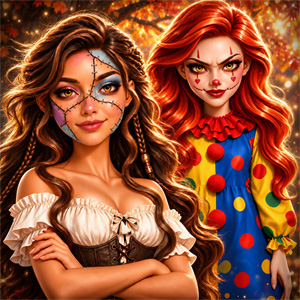
Face Paint Salon is organized around a different makeover question: how do you build the rest of a look around a painted face? The sequence starts with a spa or cleaning step, moves into face paint and makeup, and ends with a bright outfit and a photo-ready result.
That order matters. The face design is the main visual decision, while the makeup and clothing support it. Choosing the dress first can make the final look feel disconnected from the paint pattern.
Public pages describe animal-inspired face styles as one of the game’s themes. They also mention a contest setting and a final photo, but the current embedded build does not provide a reliable public scoring formula or level list. This guide focuses on the confirmed browser workflow rather than importing features from similarly named mobile apps.
For a Halloween-focused face design, try Halloween Makeup Me. For a longer skin-treatment routine before makeup, compare Spa Day Makeup Artist.
The Face-Paint Salon Workflow
1. Clean and Prepare the Face
Start with the spa or face-cleaning stage. Public descriptions consistently place skin preparation before the paint and makeup. Complete the visible treatment before choosing colors; otherwise you are judging a design on an unfinished base.
Use the indicated tool over the active area and wait for the game to show that the step is complete. The exact product names are not documented consistently for this browser version, so do not assume a fixed list of masks, cleansers or treatments.
The preparation stage also gives you a moment to decide on the overall theme. A soft animal pattern, a bold party look and a more decorative design need different levels of color and detail later.
2. Choose the Main Face-Paint Idea
The face paint is the centre of the game. Pick the broad pattern or animal-inspired direction first, then think about colors and smaller details. Starting with a large visual idea is easier than collecting isolated decorations and trying to connect them afterward.
A useful test is to identify the first thing you want another player to notice. If that is the painted shape, keep the later makeup and outfit from becoming equally dominant.
3. Apply the Paint Carefully
Public game pages describe applying a pattern to the face, while some listings frame the skin as a canvas for the design. If the tool requires a click, tap, or movement over the face, follow the gesture shown by the current interface.
Work across the intended area instead of clicking repeatedly in empty space. If the game uses a guided paint action, wait for the visual response before selecting another color or design.
Do not assume that a design must be perfectly symmetrical unless the interface clearly asks for that. The available evidence supports creative face painting, not a hidden precision rule.
4. Add Makeup around the Paint
After the face design is established, use makeup to frame it. Makeup should make the paint easier to read rather than cover its most important lines.
If the paint is bright or detailed, try a quieter lip or eye color. If the design is simple, one makeup accent can give the face more contrast. Change one facial element at a time so you can see whether it improves the composition.
This is the key relationship in the game: face paint provides the theme, while makeup controls the supporting emphasis.
5. Choose the Bright Outfit
The final dress-up stage completes the salon presentation. Public descriptions specifically recommend a bright outfit for the contest-style finish. Match the clothing to the face design instead of choosing the most decorated item automatically.
A strong outfit can echo one paint color without repeating every color. If the face already contains several bright tones, a cleaner clothing shape can keep the character readable. If the paint is minimal, the outfit can carry more of the visual energy.
6. Review and Take the Photo
Public listings mention taking a photo at the end. Use that point as a full-look review. Check the face, makeup and clothing together before finishing.
Ask:
- Is the face-paint theme still visible?
- Does the makeup frame the design instead of competing with it?
- Does the outfit match the same party or animal direction?
The photo is a documented end-of-look activity, but no reliable source confirms permanent saving or a photo gallery for the current iframe.
Designing Animal-Inspired Looks
Animal styling works best when one feature establishes the reference. You might use a strong eye shape, a repeated color, a contrasting cheek detail or an accessory that supports the theme. You do not need to make every part of the character literal.
Try this process:
- Choose the animal or pattern direction.
- Select the main paint shape.
- Repeat one color in makeup or clothing.
- Keep the remaining accessories simple enough that the face remains the subject.
This creates a visual link between the salon stages. The face does not become a separate drawing pasted onto a random dress.
Common Mistakes
Choosing the Outfit Before the Face Design
The game’s identity is face painting, so the clothing should support the result. Start with the canvas and theme before selecting the final fashion layer.
Adding Makeup before the Paint Is Clear
If you apply strong cosmetics too early, it becomes harder to judge whether the face pattern works. Complete the main paint first, then add one supporting makeup choice at a time.
Using Every Bright Color
Animal and party themes can invite many colors, but too many accents can hide the main pattern. Let one or two colors lead and use the rest sparingly.
Covering the Design with Accessories
Accessories should finish the look. If they distract from the painted face, remove the newest item before changing the entire design.
Treating the Spa Step as Optional
Public descriptions place face cleaning before painting. If a later tool does not respond, return to the active preparation step and complete it first.
If a Tool Does Not Respond
The public controls are described as click-based, with touch support on mobile listings. Depending on the current tool, the game may expect a click, tap or movement over the active face area.
- Confirm that the spa or cleaning action is finished.
- Apply paint over the visible face rather than the surrounding background.
- Wait for the design to appear before selecting the next color.
- Try a direct click or tap if a drag produces no response.
- Use the gesture shown by the current embedded interface instead of assuming every item works the same way.
There is no reliable source for a universal refresh fix. Progress saving has not been confirmed for the Girl-Games.io embedded build.
Replay Ideas
Replay the same salon session with different priorities. In one run, let the face paint lead and keep the outfit simple. In another, choose a bright fashion look and use the paint as a smaller supporting accent.
You can also keep the same paint design and change only the makeup, then repeat with a different clothing color. This shows how much of the final impression comes from the canvas itself and how much comes from the surrounding styling.
These are player-created styling tests, not documented levels or rewards.
How It Compares with Similar Games
Halloween Makeup Me is the closer match when you want themed face makeup tied to Halloween looks. Face Paint Salon is broader and more focused on treating the face as an open canvas before completing a bright outfit.
Spa Day Makeup Artist gives the spa stage more importance and moves into a general makeover. Face Paint Salon’s distinctive decision is the painted design itself, so the makeup and clothing are judged by how well they frame that design.
Makeup Master Game is a deeper preparation-led makeover with a more extensive skincare-to-makeup process. Choose Face Paint Salon for a shorter, visual design task centred on face art.
Controls and Browser Notes
Public listings describe click controls and mobile touch play. Use a click or tap to select a tool, and follow any visible movement prompt when applying paint to the face.
The game is identified as an HTML5 browser title. Device behavior and touch response can vary inside an embedded frame. Progress saving, photo persistence and a public score formula have not been confirmed for the Girl-Games.io version.
FAQ
What is the main activity in Face Paint Salon?
The main activity is creating a face-paint design after preparing the face, then completing the look with makeup and clothing.
What should I do first?
Begin with the spa or face-cleaning step. Public descriptions place preparation before painting and makeup.
Can I create an animal-inspired design?
Public pages describe animal-style face painting as one of the game’s themes. The exact patterns visible depend on the current embedded build.
Should makeup come before face paint?
The documented flow places the paint design before the finishing makeup. Build the main pattern first, then use makeup to support it.
What if the paint tool does nothing?
Complete the current preparation step, then apply the gesture shown by the tool over the face area. Try a direct click or tap if dragging is not requested.
Does the final outfit matter?
Yes, the public descriptions include a dress-up stage and recommend completing the painted look with a bright outfit. Choose clothing that supports the face theme.
Does progress save?
Progress saving has not been confirmed for the current Girl-Games.io embedded build.
What should I play next?
Try Halloween Makeup Me for themed makeup, or browse Makeup Games for more salon and beauty games.
Sources and Version Notes
This guide was checked against public pages for Face Paint Salon - Makeover Game:
- YAD — Face Paint Salon — face spa, makeup, animal-style painting, dress-up and final photo.
- Zarium — Face Paint Salon - Makeover Game — contest context, spa preparation, face painting and bright outfit.
- PLIX.GG — Face Paint Salon - Makeover — browser description, face-paint canvas, styling advice and controls.
- Y8 — Face Paint Salon — face-paint concept, browser play and mobile listing.
The current Girl-Games.io iframe remains the version of record. Similarly named mobile face-paint apps were excluded because their levels, characters and purchase systems are not evidence for this browser build.